

👋 Hey, Sahil here - welcome to this edition of Venture Curator, where we break down how great startups grow, how top investors think, and what’s shaping the future of tech.
P.S. Get access to 100+ startup & VC resources, investor databases, fundraising templates, 150+ premium archive posts and exclusive startup research - all in one place.
FROM OUR PARTNER - CYTONICS
This “Super-Protein” Could Be a $1B Opportunity

Nearly 1 in 2 Americans will develop osteoarthritis in their lifetime*.
Big Pharma spent $1B+ trying to cure this debilitating disease with synthetic drugs. It couldn’t.
Cytonics developed what could be the first potential cure for osteoarthritis by harnessing and optimising the protein our bodies create to defend against joint degradation.
Now it’s 200% more potent. And it just cleared Phase 1 clinical trials.
Don’t miss your chance to invest in Cytonics before the next phase begins.
*Source: CDC - Arthritis Risk Factors
This is a paid advertisement for Cytonics Regulation CF offering. Please read the offering circular at https://invest.cytonics.com/.Forward-looking statements are subject to risks and uncertainties. There is no guarantee of performance. Past performance does not predict future results. All investments involve risk, including loss of principal.
📜 DEEP DIVE
How to Build Your Personal and Business AI Agents With Claude (No Coding Required).
No code. About an hour. Two working agents by the end, one for your daily work, one for your business. Every step and prompt ready to paste.
Five to fifteen hours a week.
That’s what founders who use AI well quietly hand back to themselves. Yet of all the companies experimenting with AI agents, only about one in ten has one actually running. Everyone’s dabbling. Almost nobody’s built the thing.
That gap is what this issue is about, and if you don’t code, you’re standing right in the middle of it.
Here’s how it’s felt: everyone’s talking about “agents,” but every guide is written for engineers, so you close the tab and go back to the slow way. Open a chat, re-explain who you are, copy the answer out, start over tomorrow. That’s not an agent. That’s an intern with no memory.
The difference between chatting with AI and having an agent isn’t technical skill. It’s setup. You set it up once, and from then on it knows you, reaches your tools, and does the job the moment you ask. No code, no developer. Let me show you.
This guide is going to walk you through it slowly and completely. We wrote it the way a founder who has already done this would sit down and explain it to a friend over coffee.
What’s inside this guide
What is an AI agent, really? How much time and money does this actually save me?
What are the four ingredients every agent is built from? Learn these once, and you can build an agent for anything.
How do I build a personal assistant that knows me?
How do I build an agent for my business? Three complete, ready-to-use versions.
What’s the prompt formula that separates an agent that works from one that gives you junk?
What do I do when the output isn’t great? A two-minute fix almost nobody knows.
When should I level up, and how do I stay safe?
By the end, you won’t just have read about agents. You’ll have two of them running, and you’ll know how to build a third for any job you can think of.
Let’s get into it.
So what is an “AI agent”?
Forget the jargon.
An AI agent is just an assistant you set up once so it already knows your situation and can do a specific job on command, without you re-explaining everything.
Think of a great human assistant. What makes them valuable isn’t genius; it’s that they know your context: how you like your emails to sound, which meetings matter, what your past work looks like.
You don’t brief them from scratch every morning. You say “handle this,” and they do. An agent is the same idea. Give it that context once, and it works the same way.
What one can do for you starting this week: draft emails in your voice, prep you for meetings, sort and reply to your inbox, research a prospect before a call, turn messy notes into clean docs, and write first-draft support replies. Not someday. A Tuesday afternoon of setup.
And it pays off.
AI-using small businesses save five to fifteen hours a week on content and admin alone; at $25 an hour, that’s $6,500 to $19,500 of your time back every year.
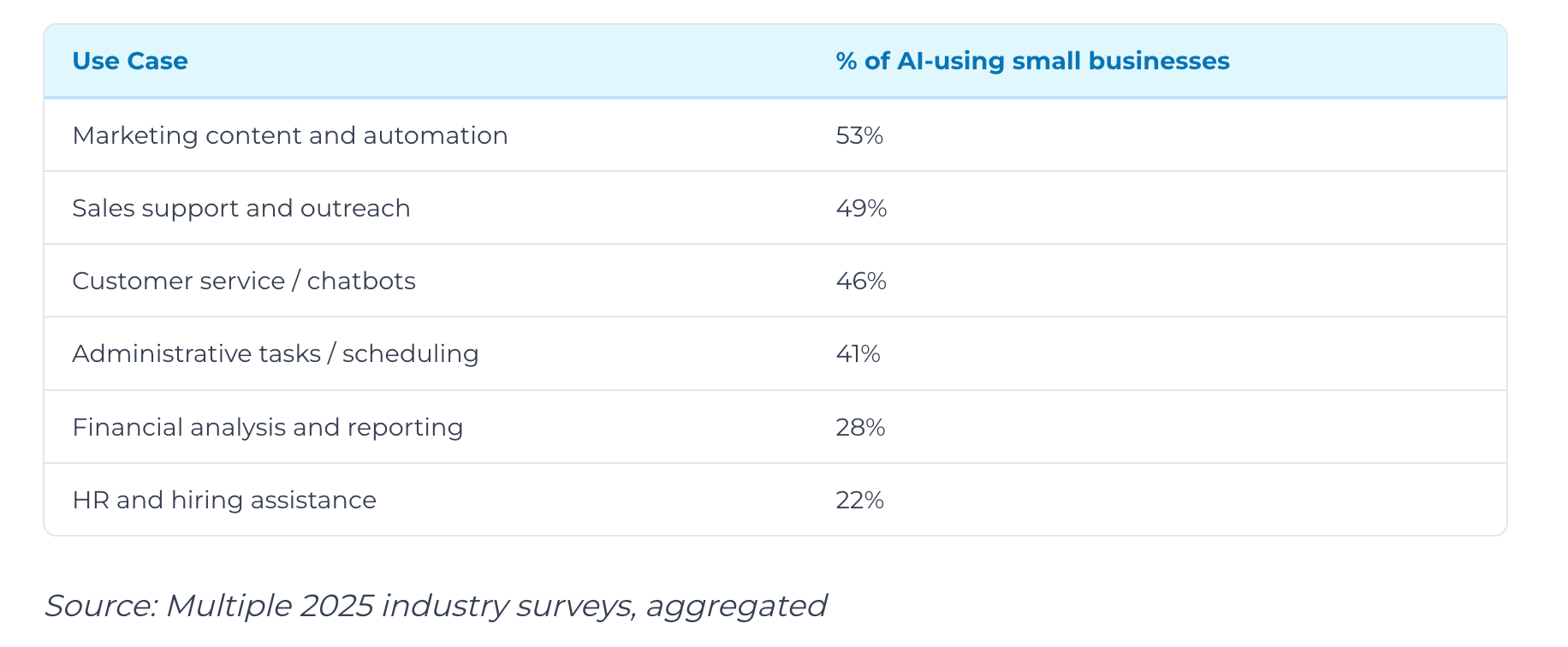
Productivity jumps 26% to 55% in the areas where AI is actually deployed, and AI-enabled owners are nearly twice as likely to report growth.
The catch, and the reason this guide exists: those gains go to founders who set it up properly, not the ones typing into a blank box and hoping. That gap, between “I tried AI a few times” and “I have an agent that does this job,” is the whole game. Let’s close it.
The one idea behind every agent: four ingredients
Before we touch a single button, here’s the idea that makes all of this simple.
Every agent you will ever build, whether it’s for your own inbox or for your business, is made of exactly four things.
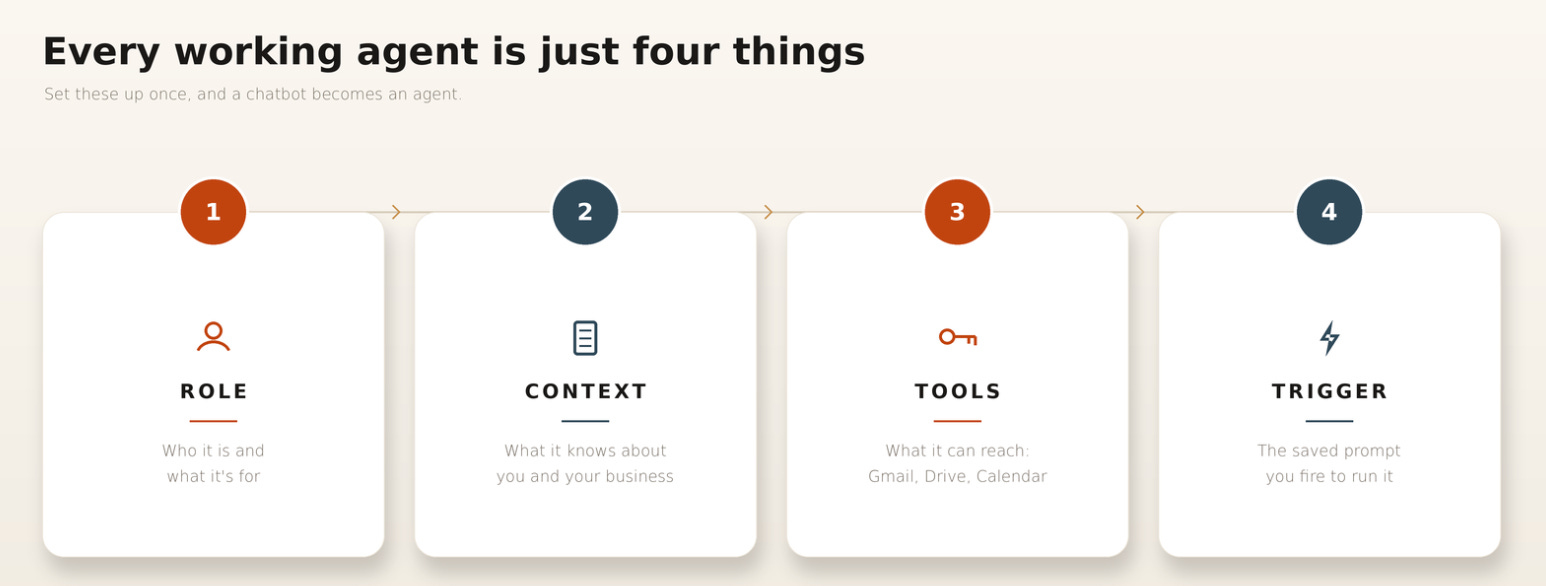
A role.
Who it is and what it’s for. “You are my executive assistant.” “You are our customer support specialist.” This is you handing it a job title.
Context.
What it needs to know to do the job well. Facts about you, your company, your customers, and the way you like things done. This is the onboarding.
Tools.
What it’s allowed to reach into. Your email, your documents, your calendar. This is giving it the keys to the right drawers.
A trigger.
The instruction you give to make it run the same way every time. “Prep me for this meeting.” “Draft a reply to this customer.” This is you saying “go.”
That’s the whole thing. The reason most people feel like AI “doesn’t really work for them” is that they only ever give it ingredient four, the trigger, and skip the first three. They ask a stranger to do a job without telling it who it is, what it should know, or what it can use.
We’re going to give it all four, and that’s what turns a chatbot into an agent.
Everything above is the why. Below is the build part:
The 5-step setup, click by click
Your personal assistant, with the exact prompt to paste in
Three ready-to-use business agents: customer support, sales-call research, and content repurposing, each with its full prompt
The two-minute fix for when the output isn’t great
When to level up, and how to stay safe
Subscribe to Venture Curator Premium and get 20% off, forever.